Showing posts with label google. Show all posts

Wednesday, July 8, 2009

Google is entering Operating Systems..


Google announced Google Chrome Operating System today, which they claim to be Open Source, Light weight, Simple and Secure. Check Out the announcement!


"It's been an exciting nine months since we launched the Google Chrome browser. Already, over 30 million people use it regularly. We designed Google Chrome for people who live on the web — searching for information, checking email, catching up on the news, shopping or just staying in touch with friends. However, the operating systems that browsers run on were designed in an era where there was no web. So today, we're announcing a new project that's a natural extension of Google Chrome — the Google Chrome Operating System. It's our attempt to re-think what operating systems should be." -Google Official Blog

It will hit the markets in 2010.
"Speed, simplicity and security are the key aspects of Google Chrome OS. We're designing the OS to be fast and lightweight, to start up and get you onto the web in a few seconds. The user interface is minimal to stay out of your way, and most of the user experience takes place on the web. And as we did for the Google Chrome browser, we are going back to the basics and completely redesigning the underlying security architecture of the OS so that users don't have to deal with viruses, malware and security updates. It should just work." -Google Official Blog

Google adds that the OS will be “running within a new windowing system on top of a Linux kernel”.
"We hear a lot from our users and their message is clear — computers need to get better. People want to get to their email instantly, without wasting time waiting for their computers to boot and browsers to start up. They want their computers to always run as fast as when they first bought them. They want their data to be accessible to them wherever they are and not have to worry about losing their computer or forgetting to back up files. Even more importantly, they don't want to spend hours configuring their computers to work with every new piece of hardware, or have to worry about constant software updates. And any time our users have a better computing experience, Google benefits as well by having happier users who are more likely to spend time on the Internet." -Google Official Blog

I think this can be a game changer. We might be seeing a major shift to lighter, more web oriented operating systems, keeping all major software on the cloud and giving you a faster, more responsive UI - specially when doing most of our work on the browser.


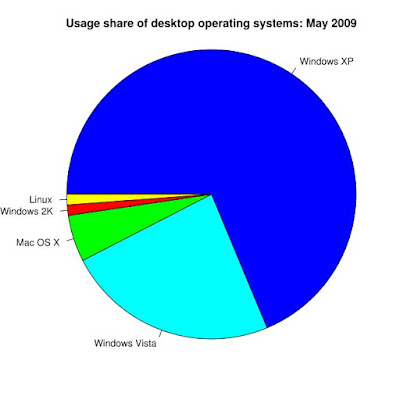
I also wonder whether Google OS can take on Windows? So far Microsoft is eating the most of the OS market. Even Apple cannot stand against it (with a less than 10% share). Yet Google has been the one company to present a serious challenge to Microsoft to-date, especially on the Web. Let's see what "don't-be-evil" can do here.


Leave your comments!

Friday, May 29, 2009

Google wave Preview

Watch it fully.. it's awesome..

Wednesday, October 1, 2008

TimeTravel to 2001..

In honor of its 10th birthday, Google has brought back their oldest available index. So now you can search the internet of year 2001; And thanks to Internet Archives, you can also explore the older version of those sites.

So, Take a journey back into the past.. to January 2001.
http://www.google.com/search2001.html

Try some interesting queries and find out what these words meant in 2001..
wikipedia
gmail
gtalk
wtc
email
blog
2008
social network
orkut
web 2.0
ubuntu
ipod
xp
youtube
mars mission
.
.
(Also let us know about more such queries in your comments..)

So, Think about it.. पिछले सात सालों में मैंने पाया... .. :)

Tuesday, September 2, 2008

Google is introducing Google Chrome !

Fasten your seat-belts.. Google is coming up with its very-own open-source web-browser named Google Chrome! Tonight!!


"We will be launching the beta version of Google Chrome tomorrow in more than 100 countries."
- Says Official Google Blog
    on 1st Sept, 2008


By the time you read this, it could have been released. We expect it to be accessible at http://www.google.com/chrome (which is currently giving 'Error 404')


Read this Great Explanation of the features!


As Blogoscoped summarizes it:

  • Google Chrome is Google’s open source browser project.This will be based on the existing rendering engine Webkit. Furthermore, it will include Google’s Gears project.

  • The browser will include a JavaScript Virtual Machine called V8, built from scratch by a team in Denmark, and open-sourced as well so other browsers could include it. One aim of V8 was to speed up JavaScript performance in the browser, as it’s such an important component on the web today. Google also say they’re using a “multi-process design” which they say means “a bit more memory up front” but over time also “less memory bloat.” When web pages or plug-ins do use a lot of memory, you can spot them in Chrome’s task manager, “placing blame where blame belongs.”

  • Google Chrome will use special tabs. Instead of traditional tabs like those seen in Firefox, Chrome puts the tab buttons on the upper side of the window, not below the address bar.


  • The browser has an address bar with auto-completion features. Called ’omnibox’, Google says it offers search suggestions, top pages you’ve visited, pages you didn’t visit but which are popular amd more. The omnibox (“omni” is a prefix meaning “all”, as in “omniscient” – “all-knowing”) also lets you enter e.g. “digital camera” if the title of the page you visited was “Canon Digital Camera”. Additionally, the omnibox lets you search a website of which it captured the search box; you need to type the site’s name into the address bar, like “amazon”, and then hit the tab key and enter your search keywords.

  • As a default homepage Chrome presents you with a kind of “speed dial” feature, similar to the one of Opera. On that page you will see your most visited webpages as 9 screenshot thumbnails. To the side, you will also see a couple of your recent searches and your recently bookmarked pages, as well as recently closed tabs.


  • Chrome has a privacy mode; Google says you can create an “incognito” window “and nothing that occurs in that window is ever logged on your computer.” The latest version of Internet Explorer calls this InPrivate. Google’s use-case for when you might want to use the “incognito” feature is e.g. to keep a surprise gift a secret.

  • Web apps can be launched in their own browser window without address bar and toolbar. Mozilla has a project called Prism that aims to do similar (though doing so may train users into accepting non-URL windows as safe or into ignoring the URL, which could increase the effectiveness of phishing attacks).

  • To fight malware and phishing attempts, Chrome is constantly downloading lists of harmful sites. Google also promises that whatever runs in a tab is sandboxed so that it won’t affect your machine and can be safely closed. Plugins the user installed may escape this security model, Google admits.


Screenshot:


So.. Happy Chroming..! :)

Wednesday, August 27, 2008

Google Reader's Easter Egg

Login to your Google Reader Account
& press -> up up down down left right left right b a

Sunday, August 24, 2008

It's wrong.. man !

It's wrong, dear google!


Try it yourself! :)

Saturday, July 12, 2008

Google looks Lively.. with 'a 3D virtual experience' !


Google Launched an online 3D social arena called Lively 3 Days ago.

When we recently read news of Google's new Lively service, it kinda threw us for a loop because it just does not sound like something Google would do. (Says cybernetnews.com) Lively is like Google's own Second Life, it's a place to go for a 3D virtual experience. Users Download Lively for free (Windows only at the moment), and then use Firefox or Internet Explorer to exist in their virtual world. Websites and blogs across the web will be able to embed a Lively room on their sites that visitors will be able to enter. Google has also teamed with Facebook to allow people to enter there as well, and eventually it will work with MySpace too.

So what made Google decide to do something like this? Maybe advertising? That's what we thought until Google confirmed that they wouldn't be selling advertising in Lively. Perhaps it's just to get more people using Google's services which can ultimately result in more money for Google?

People will get involved with Lively by creating an avatar, creating various spaces that they can decorate, and visiting other rooms. They'll even be able to have televisions in their rooms playing user-selected videos from YouTube. According to Google, "The Lively team wants to help people experience another dimension of the web. We hope you will use the product to express yourself with and without words, and to do this in the places you already visit on the web."

Read more

To get started, go to www.lively.com or checkout some of the rooms to see if any of them would be interesting to you, or you can create your own room.

Also you can embed your room at your website or blog, but I have not tried that yet. Wait for more updates.


UPDATE: Guided Tour to Google Lively

Sunday, June 15, 2008

Google's new Favicon

You may have noticed that Google has a new favicon, the small icon you see in your browser next to the URL or in your bookmarks list.

Marissa Mayer (VP Search Products & User Experience, Google) and Micheal Lopez (Web Designer, Google) write about this ..

"Some people have wondered why we changed our favicon -- after all, we hadn't in 8.5 years(!). The reason is that we wanted to develop a set of icons that would scale better to some new platforms like the iPhone and other mobile devices. So the new favicon is one of those, but we've also developed a group of logo-based icons that all hang together as a unified set. Here's the full set:


"The design process we went through was rigorous and interesting. We tried in total more than 300 permutations. It was much harder than we thought at first. We wanted something distinctive and noticeable, so we aimed toward transparency or semi-transparency, so the image would have a more distinctive noticeable shape than just a block. We wanted something that embraced the colorfulness of the logo, yet wouldn't date itself. Since we don't really have a symbol that means Google, we felt it best to work with the logo and letters within it. Our design team tried literally hundreds of approaches. You can see some of our explorations here.


"By no means is the one you're seeing our favicon final; it was a first step to a more unified set of icons. However, we really value feedback from users and want to hear your ideas that we may have missed. If you have your own notions about the Google favicon, please send them to us. We'll do our best to work them in, and maybe your idea will be the one that people see billions of times per day."

Update:
More from others ..

Saturday, May 24, 2008

The Internet FAQ from 2085

What was the internet?

The internet and the world web was a computing system to transfer human information. Scientists have based its beginning to the years 1920 to 1940.

What was electromail?

Electromail was another transport protocol to transfer human information, but it was quickly discontinued as it caused misunderstandings due to lack of correctly representing emotions.

What were world web sites?

A so-called world web site consisted of an address of its owner to locate their physical business location, as well as other miscellaneous transmitting of human information that was considered important at the time. The protocol used to decode the information was called hypertext, and as its standards changed quickly over the years, it is impossible to decode most of the information contained within.

I noticed the word “NSFW” in a world web sites museum displaying hypertext reproductions. What does it mean?

Scientific research at the late Mars Research Laboratory came to the conclusion that NSFW announced the display of a widely popular human called Britneyspears in the 1970s. Why warnings were issued before the viewing of this human is unclear.

Did the world web have version numbers?

Yes. In the beginning, the world web was numbered from 1 to 10, with most people considering world web 8 to be the first stable release. Afterwards, the world web received code names for each new version, like “Omega Sun” or the popular “Happy Happy Rabbit" release.


A picture showing the internet. It is unclear what it depicts.


Who controlled the internet?

The internet was controlled by the governments, then for a brief period by personal humans all over the world, and then again by the governments. The intermittent period of personal human control was subsequently named the internet dark age as it incited to unlawful behavior.

What alternative information transfer technologies accompanied the internet?

The internet was only one of many transfer technologies. Equally popular at the time were the Ipod, also called Phone, a device to record and emit copies of the human voice, as well as the so-called Pongmachine which showed an animated bright shape on a dark background.

What was the Googlecom?

The Googlecom was a government-supervised computerized mechanism for human information storage and retrieval. It subsequently became integrated into the Universal Intelligence in around 2035.

Did the internet help the birth of the Universal Intelligence?

It is believed that the internet was an important mechanism to copy, spread and advance the ancestor of the Universal Intelligence. While the human civilization host system was unstable, progress was quickly reached after the invention of self-developing computerized intelligence machinery.

What was the Worldthought, the Netlink, and the Civilitron?

This FAQ only deals with planet number 5010; for the early computing systems of other planets, please refer to FAQs number 1 - 10000.

How long did humans take to invent the internet?

Scientific research believes that humans took around 150,000 years to build the internet and the world web as well as electromail. To explain the delay, it is believed that a human brain needed around 20 seconds to calculate an expression like 12 * 390, whereas it was incapable of calculating expressions like 12 * 3903829. Other inhabitants of the planet such as Bonobo Apes or the Arrowtooth Eel are believed to have had higher brain capacities, but no intent to build the internet.

Which entities were most popular on the internet?

While early hypertext storage can only be vaguely decoded, scientific research believes that from 1970 to 1999, the most popular entity on the internet was Britneyspears; from 2000 to 2020, it was Pleaseclickhere; from 2021 to 2030, it was the Mechabot100 release.

When did the internet end?

The internet ended with the end of planet number 5010, which is widely attributed to the fact that humans were using transportation facilities called autocars which only used around 1/5th of their transportation storage capacity, causing the planet to overheat. Copies of the internet are available in other systems though so you can read the archive at anytime.

I am interested to find out more about humans, where can I see them?

You can find representative entities of the human species in most local zoos. Visitors of model version 4.55 and lower receive special discounts; while the brain of humans is likely incapable of experiencing pain, please do not feed or break them.

Check out >

Thursday, May 8, 2008

Plastic bag conquers Google Street View

A block of College Road in Fairbanks, Alaska, along with portions of Minnie St. and Third St. show what a driver would see only if wearing a plastic bag on his or her head.


As Google Sightseeing observes, you can tell what it is by the fact that it says "plastic bag" on the inside.

Privacy advocates should take note of an effective way to avert the prying eyes of Google Street View: the lowly plastic bag.

Check out before they update it!

Sunday, March 30, 2008

Mash YouTube Videos


Omnisio lets you paste in the URL of a YouTube video (among other video sites) and then crop the time slider to a specific part. You can then add more videos if you want, and publish the result to show to others – without even registering at the site, a cool approach. The site is fairly straightforward to use and all in all well done, albeit the editor interface is unnecessarily confusing*, and there seems to be a bit of a lack of available effects (like fade in/ fade out, color effects, text overlays and such).

Note that, YouTube also has an online video editor (with some issues, though).
Also, Google Video allows you to directly link to a certain part within the video by appending e.g. #4m12s (the minutes and seconds into the video) to the video URL.

Check out

Google's Maps Street View API


It looks like Google Maps Street View has been added to the Google Maps API. The interactive 360 degree panoramic images that Google provides for a number of cities on Google Maps has, until now, not been available to developers to add to their Google Maps mashups.

Check out

Wednesday, February 13, 2008

And this is how it all started ..

(History & Future of the search)
(Edited from the Stanford Magazine article from 2004 – “Net Assets: How Stanford’s computer science department changed the way we get information” by Richard Brandt)

The Internet is today’s equivalent of the Alexandria library, with more than 500 billion web pages and growing. Making sense of this morass is more crucial than ever in a world that runs on information. The right—or wrong—intelligence affects decisions from running economies to going to war. It has become obvious that search technology is the single most important application on the Internet.

As it happened, 1994 was the year Netscape Communications released its web browser, transforming the esoteric Internet into the point-and-click World Wide Web. (People now use the two terms interchangeably.)

The first Stanford students to make a commercial success out of helping people find things on the Internet were David Filo and Jerry Yang, who started Yahoo! The venture was never a true search engine—a software program that pulls up web pages relevant to keywords the user types. Rather, it started simply as a hand-selected list of interesting websites called “Jerry’s Guide to the World Wide Web.” It evolved into “Yet Another Hierarchical Officious Oracle,” or Yahoo!, a portal offering hand-selected sites and free software deemed useful by Yahoo’s “domain” experts—the equivalent of Callimachus’s bibliography. To find other web pages, Yahoo! offered search engines licensed from other companies.

The Yahoo! story also began in 1994. As part of their Stanford doctoral course work, Filo, (MS in’90), and Yang, (MS in ’90), wrote a business plan based on their web guide. Students had to evaluate each other’s plans, and Brian Lent, a PhD student in the database group, gave Yahoo! a D-minus. Lent, (MS in ’95), thought the selection process should be automated, rather than hiring scores of experts to find the right sites as the web grew.

Let that be a lesson to anyone with ambitious plans for their research: you have to ignore a lot of naysayers. When Filo asked Lent if he would like to join Yahoo! as employee No. 1, in order to keep the founders on their toes with his skepticism, he laughed. “You couldn’t pay me enough money to work for a company called Yahoo!” he recalls saying at the time.

Still, Lent was at least partially right. By the late 1990s, almost all search engines had given up trying to make search a profitable enterprise and were busily transforming themselves into portals modeled after Yahoo! But after Google showed up in 1998, most of those portals went out of business, while Yahoo! spent about $2 billion buying search technology to add to its site. Microsoft eventually started creating its own search technology, hoping to release it sometime next year.

Throughout the 1990s, search engines primarily retrieved pages according to how many times given keywords were found on a site. It’s as simple an idea as alphabetizing scrolls, and no more innovative than Yahoo!’s approach. But these engines were easy to fool. For example, by simply typing “sex” over and over again in black type on a black background to make the words invisible, site programmers could attract a lot of hits from search engines, whether or not the site had anything to do with the topic people were looking for.

When Google’s search engine was officially launched in December 1998, it was distinguished by one big attribute. It worked.

At its core is the PageRank system, invented by Larry Page (and named after him) while he was working on his PhD at Stanford. PageRank, which judges a site’s importance by analyzing outside links to it, was the first true innovation in search technology since the bibliography. It takes advantage of the unique properties of the web—the network of links that makes its name so apt.

Garcia-Molina, Page’s adviser, recalls how it all started. Page came into his office one day in 1995 to show him a neat trick he had discovered. The AltaVista search engine not only collected keywords from sites, but also could show what other sites linked to them. AltaVista did not exploit this link information in the way Google would, but Page suggested it would be a good way to rank sites. He reasoned that those with the most links probably were the most popular and would prove most useful to searchers: they should be listed first in the search results. He began creating his own software for analyzing links between sites.

Meanwhile Lent, the student who had all but failed Yahoo!’s business plan, had been working with Brin on a research project within the database group. In 1995, they decided to try a little associative data mining. This is the process of finding pieces of information that commonly occur together. Retailers use it to search through their sales records and determine whether different items are frequently bought at the same time by customers. (They then can place those products as far apart as possible in the store, hoping to lure customers into additional purchases.)

Brin and Lent worked on ways to find specific word combinations that often occurred together on the Internet, such as authors and their book titles. This required searching through masses of web data, so Brin wrote a “crawler” program—software that visits websites, summarizes their content and stores the data in a central location accessible to graduate students and search companies.

He intended to call the crawler “Googol,”—after the word coined by the 9-year-old nephew of mathematician Edward Kasner for the number 10100—to reflect the enormous amount of data they were collecting. For two years, Lent recalls, they did not realize they were spelling the word incorrectly.

Later, Page combined his method of analyzing “back” links pointing to a given website with Brin’s web crawler, and their combined research moved under the Digital Library umbrella.

Lent, who had a tendency to wander back and forth between university research and corporate life, did not stick around to work with Page and Brin, a decision he confesses he regrets. But in early 1996, Lent explains, “We all said, ‘There will never be another Yahoo!’” Their research seemed purely an academic exercise. Lent was itching to get back into business, so he joined a start-up company.

But the Google search engine, first set up to troll through Stanford’s own web pages, was an immediate hit with students and faculty. Page and Brin became convinced of its commercial potential. With help from Stanford’s Office of Technology Licensing and a number of professors (see sidebar) they managed to get their company funded. To bring in revenue, they borrowed an idea from GoTo.com (later renamed Overture and acquired by Yahoo!), a sort of Yellow Pages search engine that went through ads, not websites. Google now simultaneously searches through websites and its own advertisers, listing the relevant ads next to the search results. This has become the most successful advertising approach on the Internet.

Page, (MS in ’98), and Brin, (MS in ’95), may have become yet another two PhD students to disappoint their mothers by dropping out of grad school to start a company. But the research they started continues at Stanford, officially encapsulated in a project known as WebBase. Using the techniques first developed by the Google founders, the core of WebBase is a huge archive of websites now stored at the San Diego Supercomputing Center. Researchers from Stanford and other universities around the world can download and work with information about millions of websites as they develop search and retrieval technology.

Stanford has continued to supply Google with brainpower and new ideas in search.

As for Lent, he has not given up. He got a call from Microsoft in 2003, telling him the company wanted “to kill Google,” he recalls. He considered joining the team, but decided that if Microsoft could do it, so could he. Lent is now an “entrepreneur in residence” at Silicon Valley venture capital firm Mohr, Davidow Ventures, putting together a start-up team that will tailor search to individuals’ interests.

Lent describes his quest as “a bit psychotic—I mean, who goes after Google?” But he thinks Google left him an opening. “I felt Google was stagnating,” he says. “Their core premise is still link analysis. But the other half of the equation is user behavior.” Lent has an algorithm he calls “Dynamic PageRank,” which adds the dimension of time to web searches in order to better determine people’s interests. How long do people stay on web pages; what hour, day or week are they most active; what ads do they most often click on; and what products do they most often buy? By tracking their interests and behavior, Lent thinks he will be able to give web searchers better results.

Because he “passed on two companies” that spun out of Stanford and became huge successes, Lent notes, “I need to give it a try. Google and Yahoo!, be warned.” Unless, of course, one of the companies becomes impressed enough to buy his start-up.

Google has already bought a company that was developing technology to personalize web searching. That company was founded—you guessed it —by a few Stanford computer science graduate students.

Glen Jeh was in the PhD program in 2003, working within the database group, when he co-wrote (with Widom) a prizewinning conference paper called “Scaling Personalized Web Search.” His approach to personalizing searches lets people specify their interests in advance. The problem is that adding individual preferences to web searches presents a difficult computational problem. Since there are millions of users, each with separate criteria, there are simply too many permutations to quickly find all the websites that simultaneously match search terms, have the highest PageRanks and correlate with their lists of interests.

Jeh, (MS in ’03), came up with the idea of “partial vectors,” common preferences shared by many people. Sites that match many of these preferences are given higher priority even before anyone does a search, narrowing the field. Then when an individual does a search, his or her other preferences are calculated in. That can still require a lot of expensive computing power, though, so two other PhD candidates, Taher H. Haveliwala, (MS in ’01), and Sepandar Kamvar, (PhD in ’04), improved the efficiency of calculating Jeh’s partial vectors, and the trio set up a company called Kaltix last year. Google snapped it up within months.

Some of Stanford’s computer science grads have stayed in academia, and continue to conduct research into the intricacies of web search. Junghoo Cho, (MS in ’97), (PhD in ’02), is an assistant professor at UCLA. He’s concerned about Google’s ability to alter the makeup of websites. Since a relatively small number of sites have the most links, and Google retrieves them first, those sites get visited more often and even more people link to them. Cho’s studies indicate that Google in effect drives more and more traffic to fewer and fewer sites.

Search technology research also continues at Stanford. Professor Andreas Paepcke, director of the Digital Library program, and several grad students are working on programs to search through digital photographs. Their technique combines data from the camera’s date/time stamps with information such as birthdays, holidays, vacations and major events—even data from Global Positioning System satellites—to help identify what photographs depict. This is the first step in searching through them.

Chris Manning, a professor in Stanford’s artificial intelligence group, is trying to get computers to understand “natural language,” with all its semantic subtleties, as it is used (and misused) by humans. One of Silicon Valley’s Great Tech Hopes is a “semantic web” that will allow computers employed by search engines and other sites to respond to questions written in plain English, or other languages. This is something the search site Ask Jeeves claims to do, but even Ask Jeeves executives admit their first versions were mainly a gimmick, simply picking out keywords in the questions people typed. The company is trying to improve that technology.

Stanford’s significant role as originator of search technology may be winding down, though. For one thing, this academic year will be the last for Digital Library funding. And leading research is moving into corporations, now that Google has demonstrated how profitable it can be. “We’ve been discussing the question of whether there’s anything new to do in search,” says Garcia-Molina. “With all these big companies out there, what can we do?”

Professor David Cheriton, an early investor in Google, puts it more bluntly. “When you have something like Google occur, where you can hire a bunch of great researchers all motivated by stock options, it’s hard for pure research organizations like universities to compete.”

Did anyone say, “There will probably never be another Google?”

Check out